Update 5/30/22
I found a site where someone did a complete teardown of one of the iHSV57 motors with lots of photos.
After struggling to get JMC1.7.6 software working in Windows 10 (I kept getting error messages about a log file from Microsoft .NET), and trying and failing to get it working in Windows 11, I decided to try using Robert Budde's python tool available on Github here. I struggled to get it working in Windows 10, and decided to try linux instead. I loaded the prerequisites on my old netbook that I use to communicate with the printer (Lubuntu 20.04) and then ran the program and it worked on first attempt. I am finally able to actually tune the motors!
The python tool displays the parameters and an oscilloscope similar to the JMC program, so information about tuning in videos linked below is still applicable, you just have to make some allowances for where and how the information is displayed.
When the program is running, you have a choice of selecting iHSV57 v5x or iHSV57 v6x motors. I found that the iHSV57 v6x selection allows me to communicate with the IHSV42-40-07-24 motors I am using in Arrakis and testing in UMMD. The iHSV57 v5x didn't work at all with my motors.
Update 5/29/22
I found two new videos in English, that explain how to tune these motors for CNC applications using the JMC software:
Update 5/27/22
I opened up one of the motors to see what I could see.
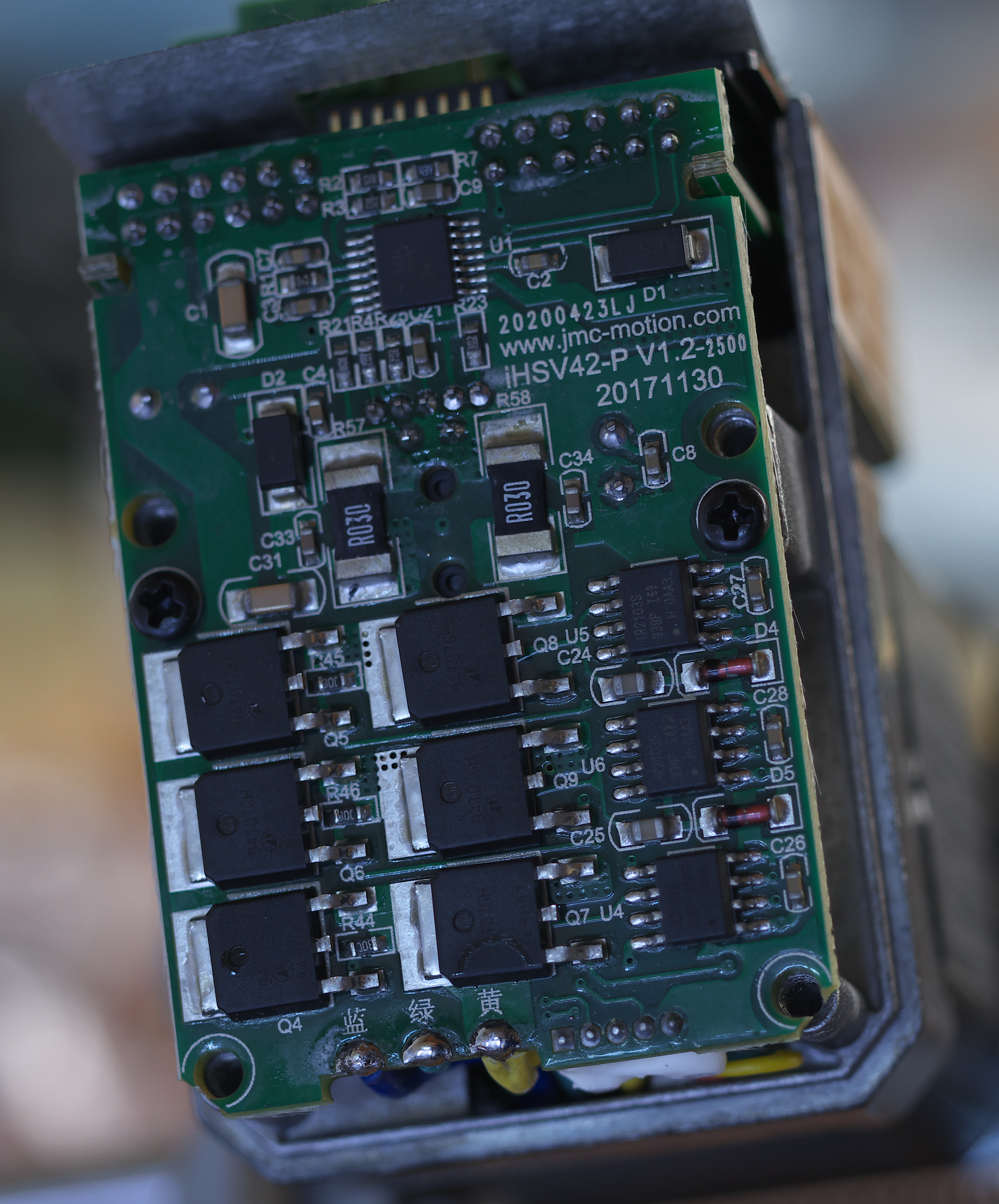 |
| One of the circuit boards. The aluminum cover that fits over this piece has a thermal pad that contacts the driver power transistors to help cool them. |
 |
| Look at that! It's actually an optical encoder! |
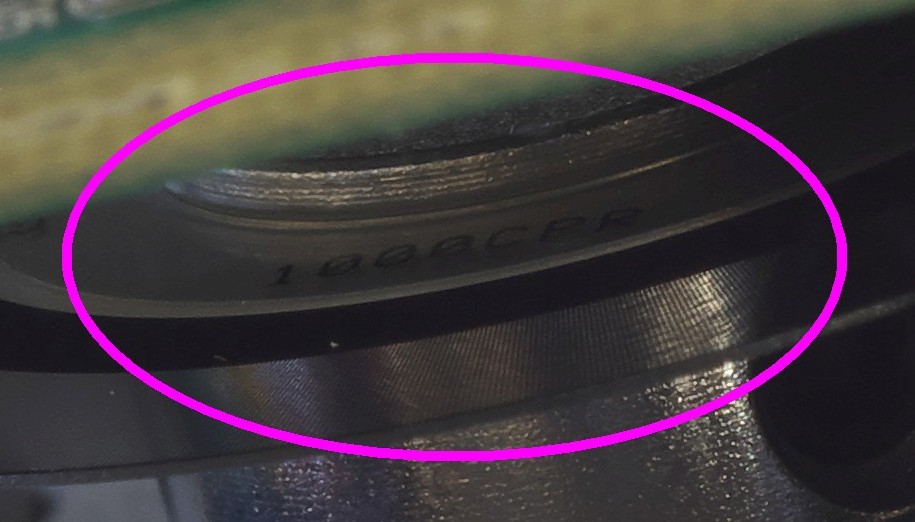 |
| Close-up of the markings on the encoder wheel- 1000 CPR (counts per rev?) |
I have produced a PCB for the returned energy dump circuit detailed below. See: https://drmrehorst.blogspot.com/2022/05/bank-account-protection-circuit-for.html
Update 3/30/21
I had a disaster with the sand table. Details in this post. The long and short of it is that the motor(s) was forced to make an abrupt stop that created a voltage spike on the power supply line, killing both the controller board and the power supply. This sort of phenomenon is well known in the servomotor world and there are engineering solutions such as this, courtesy of Gecko Drive:

There's a pdf that describes the circuit operation here. I recommend if you're going to play with servomotors that you take all precautions to protect your controller and the motor drivers.
Now back to the original post...
I recently ordered a couple iHSV42-40-07-24 78W servomotors from China with the intention of trying them in the sand table and probably also UMMD. There isn't a lot of information on these things out there, and I spent quite a while searching, so I decided to place everything I found here so others may be able to make easier use of the motors.
The motors all appear to be made by Just Motion Control in Shenzen, and are sold by many companies that list on ebay and Ali-express. The specific motors I ordered are NEMA-17 size, but the same controller is found on NEMA-23 and NEMA-34 size motors, too. One manual covers all of them.
The motor driver accepts 5V step/direction/enable signals like many stepper motor drivers, so you can drive these motors using anything you would use to drive a stepper. I spotted this device in a youtube video and it appears to be very useful for anyone who might be playing with either stepper or servomotors of this type:


You can find them on ebay for about $15. There are other parts with similar function, but this type can handle supply voltages up to 160VDC so you won't need a separate power supply to power this device for almost any stepper or servo motor you may be testing. Here's a link to an ebay search that will take you to this type device.
I made a Fusion360 CAD model of the iHSV42-40-07-24 that you can download. It is primarily useful to get the overall size, but details such as the mounting hole spacing, length of the shaft, etc., are accurate enough to design mounts. When I found differences between the actual motor and the drawing in the manual, I used measurements from the motor itself, so the CAD model is of the specific motors I received from China. As always, what you recieve from China may be slightly different!

To get optimum performance from the motors, you have to tune them for your specific application. That is accomplished by making an RS-232 serial connection to the motor and then using software that JMC provides to tweak about 100 different parameters.You can use a USB to serial converter of this type to make the connection, You can use a USB to RS-232 adapter of this type if your computer doesn't have a DB-9 serial port. Any adapter that says it uses a PL2303 chipset should work. The motors have spring terminal connections for wires, not a DB9 connector, so you'll have to either cut up an old serial cable or add a few wires to a DB9 socket so you can connect to the motors. You only need to connect the Tx, Rx, and Gnd leads from the RS-232 cable to the motor. Be sure to connect the Tx output on the cable to the Rx on the motor, and the Rx on the cable to Tx on the motor. If you can't get the computer to talk to the motor, try swapping the Tx and Rx connections, most easily done at the motor.

The motors all appear to be made by Just Motion Control in Shenzen, and are sold by many companies that list on ebay and Ali-express. The specific motors I ordered are NEMA-17 size, but the same controller is found on NEMA-23 and NEMA-34 size motors, too. One manual covers all of them.
The motor driver accepts 5V step/direction/enable signals like many stepper motor drivers, so you can drive these motors using anything you would use to drive a stepper. I spotted this device in a youtube video and it appears to be very useful for anyone who might be playing with either stepper or servomotors of this type:


You can find them on ebay for about $15. There are other parts with similar function, but this type can handle supply voltages up to 160VDC so you won't need a separate power supply to power this device for almost any stepper or servo motor you may be testing. Here's a link to an ebay search that will take you to this type device.
I made a Fusion360 CAD model of the iHSV42-40-07-24 that you can download. It is primarily useful to get the overall size, but details such as the mounting hole spacing, length of the shaft, etc., are accurate enough to design mounts. When I found differences between the actual motor and the drawing in the manual, I used measurements from the motor itself, so the CAD model is of the specific motors I received from China. As always, what you recieve from China may be slightly different!
 |
| Fusion360 model of the iHSV42-40-07-24 motor. |
 |
| Printed motor mount for the sand table that I designed around the CAD model of the motor. There's an F625 bearing in the top of the mount to support the free end of the motor shaft. |

To get optimum performance from the motors, you have to tune them for your specific application. That is accomplished by making an RS-232 serial connection to the motor and then using software that JMC provides to tweak about 100 different parameters.
Software to tune the motors is here. Plug n your USB to RS-232 cable, then unzip and run JmcServoPcControl.exe
Before you can tune parameters, you have to get your computer talking to the motors. The manual says the default communication speed is 9600 bps, but my motors were factory programmed for 57,600 bps, 8 data bits, even parity, and 1 stop bit. The first thing to do when you open up the motor programming/monitoring software is to set the serial communications parameters. Once you get the software talking to the motors, there will be a few green lights on the bottom of the window in the software indicating that the motor is on-line. Then you can start tweaking parameters.
The manual for the motors is mostly useless other than to show what all the parameters are- there's no information about tuning procedures. I found that the software provides a bit more information about the parameters and clues to the settings, but you have to connect to a motor to be able to see that stuff. I grabbed screenshots of every page defining the parameters in the software and put them together in a zip file that you can download here. The individual pages are labeled for the specific parameter numbers they define so it is easy to find the one you're looking for. I may have altered some of the parameter values before I captured the pages, so you may see something a little different the first time you connect to your motors.

How do you know what to tune? There's the rub! I found some useful information on tuning servomotors at these sites:
http://s3.cnccookbook.com/CCServoTuning.htm
https://www.machinedesign.com/archive/article/21827276/tuning-servomotors
http://s3.cnccookbook.com/CCServoTuning.htm
https://www.machinedesign.com/archive/article/21827276/tuning-servomotors
Parker Motion Servo Fundamentals
There appears to be three main operating modes for the motors, speed, position, and torque control modes, selected by the P01-01 parameter (see image above). The motor driver has some autotune modes built in to simplify the tuning process. If you enable one of those modes, the driver will make adjustments on the fly to optimize performance for speed, positioning, or current. Check page 19 of the motor manual for the P01-02 parameter setting. Once you've selected an operating and autotuning mode, there remains just a few variables to adjust manually. The Parker Motion white paper linked above has a pretty easy to understand explanation of the process of tweaking the remaining variables.
There appears to be three main operating modes for the motors, speed, position, and torque control modes, selected by the P01-01 parameter (see image above). The motor driver has some autotune modes built in to simplify the tuning process. If you enable one of those modes, the driver will make adjustments on the fly to optimize performance for speed, positioning, or current. Check page 19 of the motor manual for the P01-02 parameter setting. Once you've selected an operating and autotuning mode, there remains just a few variables to adjust manually. The Parker Motion white paper linked above has a pretty easy to understand explanation of the process of tweaking the remaining variables.
I ran into a few youtube videos of people doing various things with the NEMA-23 and 34 versions of the motors. There's a good series of videos, in German, that go into some detail about tuning the motors for a CNC machining application:
